── Attaching core tidyverse packages ──────────────────────── tidyverse 2.0.0 ──
✔ dplyr     1.1.4.9000     ✔ readr     2.1.5
✔ forcats   1.0.0          ✔ stringr   1.5.1
✔ ggplot2   3.5.2          ✔ tibble    3.3.0
✔ lubridate 1.9.4          ✔ tidyr     1.3.1
✔ purrr     1.0.4
── Conflicts ────────────────────────────────────────── tidyverse_conflicts() ──
✖ dplyr::filter() masks stats::filter()
✖ dplyr::lag()    masks stats::lag()
ℹ Use the conflicted package (<http://conflicted.r-lib.org/>) to force all conflicts to become errors
theme_set(theme_bw())
Control structures in R provide conditional flow as well as looping. An R expression is evaluated within the loop or as the result of a conditional statement.
The following are example R expressions
# First expression1+2
[1] 3
# Second expressiona <-1; b <-2; a + b
[1] 3
# Third expression{ a <-1 b <-2 a + b}
[1] 3
See
?expression
31.1 Conditionals
Conditionals include if-else type statements
31.1.1 if
# Example (boring) if statementif (TRUE) {print("This was true!")}
[1] "This was true!"
# if() using variablethis <-TRUEif (this) {print("`this` was true!")}
[1] "`this` was true!"
# if() with comparisonif (1<2) {print("one is less than two!")}
[1] "one is less than two!"
if (1>2) {print("one is greater than two!")}
Using variables
# Assign valuesa <-1b <-2# Compare valuesif (a <2) {print("`a` is less than 2!")}
[1] "`a` is less than 2!"
if (a < b) {print("`a` is less than `b`!")}
[1] "`a` is less than `b`!"
31.1.2 if-else
# Example using if-elseif (a < b) {print("`a` is less than `b`!")} else {print("`b` is not less than `a`!")}
[1] "`a` is less than `b`!"
# Second exampleif (a > b) {print("`a` is greater than `b`!")} else {print("`a` is not greater than `b`!")}
[1] "`a` is not greater than `b`!"
You can use multiple if-else statements.
# Example of multiple else statementsif (a > b) {print("`a` is greater than `b`!")} elseif (dplyr::near(a,b)) {print("`a` is near `b`!")} else {print("`a` must be less than b")}
[1] "`a` must be less than b"
Incorporate these statements into a function makes things more interesting.
# Function with if statementscompare <-function(a, b) {if (a > b) {print("`a` is greater than `b`!") } elseif (dplyr::near(a,b)) {print("`a` is near `b`!") } else {print("`a` must be less than b") }}# Use functioncompare(1, 1)
[1] "`a` is near `b`!"
compare(1, 2)
[1] "`a` must be less than b"
compare(2, 1)
[1] "`a` is greater than `b`!"
compare(sin(2*pi), 0)
[1] "`a` is near `b`!"
31.1.3 ifelse
The ifelse() function takes a logical vector as a first argument and then two scalars (or vectors) corresponding to the desired output for TRUE and FALSE elements of the vector.
# Examples of ifelseifelse(c(TRUE, FALSE, TRUE), yes ="element was true", no ="element was false")
[1] "element was true" "element was false" "element was true"
A common usage of ifelse() is in data wrangling. For example, suppose you wanted to change cut levels Ideal and Premium to a category called Best.
# Examples of ifelse within mutated <- diamonds |>mutate(# Create new variablecut_new =ifelse(cut %in%c("Ideal", "Premium"),"Best", "Not Best") )# Check resultstable(d$cut)
     Fair      Good Very Good   Premium     Ideal
     1610      4906     12082     13791     21551
table(d$cut_new)
    Best Not Best
   35342    18598
Alternatively, we could have used a case_when statement.
# Or use case_whend <- diamonds |>mutate(cut_new =case_when(# logical ~ result cut %in%c("Ideal", "Premium") ~"Best",.default ="Not Best" ) )# Check resultstable(d$cut_new)
    Best Not Best
   35342    18598
31.1.4 switch
A rarely used function is switch() which implements a case-switch comparison.
# Examples of switchthis <-"a"switch(this,a ="`this` is `a`",b ="`this` is `b`","`this` is not `a` or `b`")
[1] "`this` is `a`"
this <-"b"switch(this,a ="`this` is `a`",b ="`this` is `b`","`this` is not `a` or `b`")
[1] "`this` is `b`"
this <-"c"switch(this,a ="`this` is `a`",b ="`this` is `b`","`this` is not `a` or `b`")
[1] "`this` is not `a` or `b`"
31.2 Loops
There are 3 base types of loops: for, while, and repeat. In addition, there is a convenience function replicate that allows us to easily repeatedly execute an R expression. This function is very useful for simulation studies.
31.2.1 for
The most common use of a for loop is to loop over integers.
We will only enter the loop if the argument to while is TRUE the first time.
# Evaluated before the loopx <-2while (x <1) { print("We entered the loop.")}# Evaluated after each loopwhile (x <100) { x <- x * xprint(x)}
[1] 4
[1] 16
[1] 256
These loops will run until the argument in the while() function evaluates to FALSE. If this doesn’t occur, you have an infinite loop. To exit an infinite loop, use the ESC key.
while (TRUE) {# do something}
Often, you will want to make sure the infinite loop never occurs. You can do this by counting the number of iterations of the loop and limiting how many iterations can be executed.
max_iterations <-1000i <-1while (TRUE& (i < max_iterations) ) { i <- i +1# Do something}print(i)
[1] 1000
31.2.3 repeat-break
An alternative to while() is repeat combined with break.
# repeat breaki <-10repeat {print(i) i <- i +1if (i >13)break}
[1] 10
[1] 11
[1] 12
[1] 13
Using next allows you to go to the next iteration of the repeat statement rather than breaking out of it.
i <-1repeat {print(i) i <- i +1if (i %%2) { # %% is the mod function, 0 is FALSE and 1 is TRUEnext# skips to next iteration of repeat }if (i >14)break}
break also allows you to exit any loop including for and while loops.
31.2.4 replicate
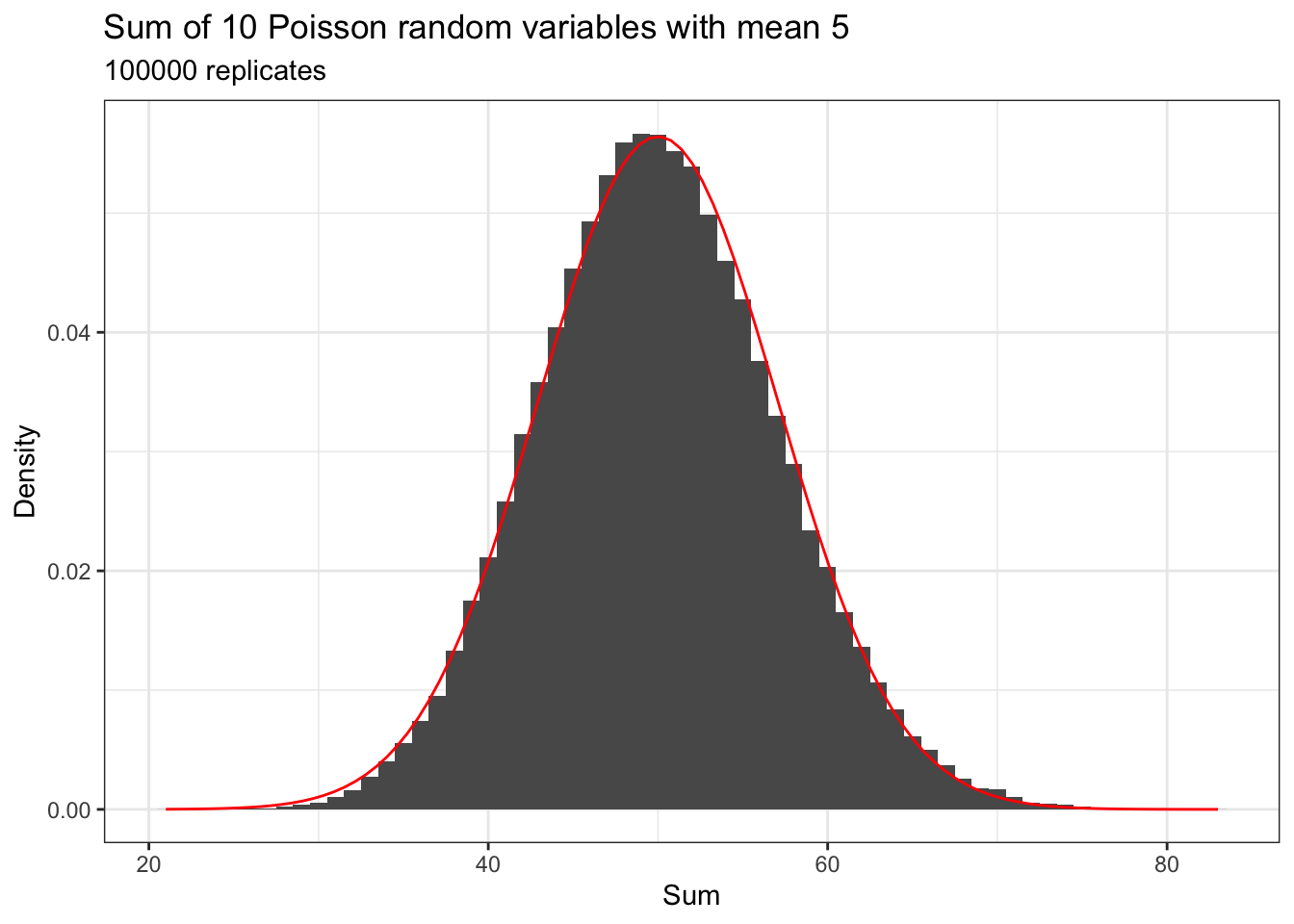
The replicate function allows you to repeatedly execute an R expression. This can be handy in simulation studies.
# Demonstrate Central Limit Theorem for Poisson random variablen_reps <-1e5# Number of replicatesn <-10# Number of Poisson random variables in each sumrate <-5# Mean for each Poisson random variable# Construct data frame with sumsd <-data.frame(samples =replicate(n_reps, { # number of replicatessum(rpois(n = n,lambda = rate)) }))# Plot histogram with best fitting normal (bell-shaped curve)ggplot(d, aes(x = samples)) +geom_histogram(aes(y =after_stat(density)),binwidth =1,center =0) +stat_function(fun = dnorm,color ="red",args =list(mean = n * rate,sd =sqrt(n * rate) )) +labs(title =paste("Sum of", n, "Poisson random variables with mean", rate),subtitle =paste(format(n_reps, scientific =FALSE), "replicates"),x ="Sum",y ="Density" )
31.3 Summary
In this chapter we introduced a wide variety of functionality for programming in R including conditionals (if, else, ifelse) and loops (for, while, repeat).